In this article, I’ll walk you through six free mastering plugins that are worth keeping in your folder. Mastering involves several specific tools working together, including EQ, compression, saturation, stereo shaping, and limiting or clipping for loudness. Finding free plugins that genuinely handle each part of the chain saves money and helps you build a usable mastering setup without paying for expensive bundles.
Over the years, I’ve tested plenty of free mastering plugins, and the ones on this list are the tools I keep coming back to because they sound clean, run reliably, and handle real mastering work without feeling stripped down.
This list isn’t about chasing every freebie. It’s about practical mastering plugins that can sit on a master bus, mix bus, or even premaster chain depending on the situation, and that pair well with whatever DAW you’re working in.
Whether you’re using Ableton, FL Studio, Logic, or another DAW, these plugins should fit into your sessions without much trouble. Let’s get into it.
1. Slate Digital Fresh Air
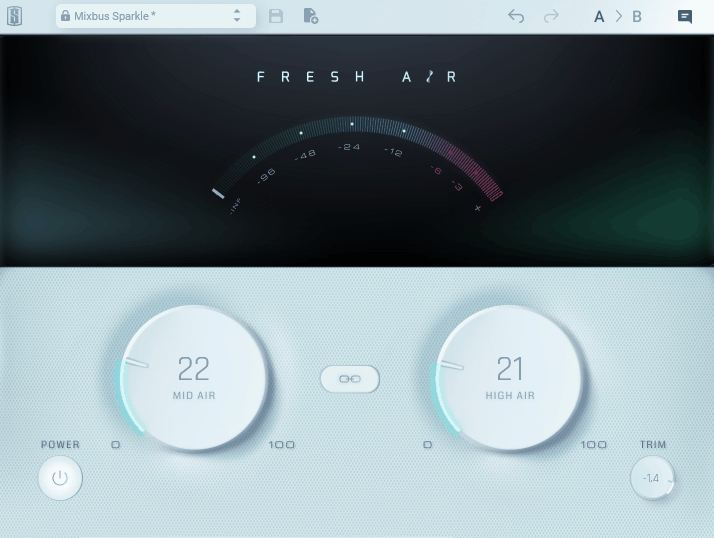
For producers who want a simple way to add polish and clarity to a master, Fresh Air is a useful tool worth keeping around. What I like about Slate Digital’s plugin is how easy it is to get good results. With just two knobs, you can lift a mix, add modern shimmer, or polish a master bus without spending time on detailed EQ work or stacking processing.
The plugin earns its spot through pure utility on master buses and mix buses where you want subtle finishing polish. For producers who don’t want to dive into multiband processing for top-end shaping, this handles the job quickly.
- Mid Air Knob
The Mid Air control lifts the upper-midrange presence of a mix, which gives it more clarity without making things harsh. It’s useful when a mix feels slightly buried and needs a small lift in the presence range.
The processing feels musical rather than surgical, so it works well even at higher settings, and it brings mixes forward without making them feel over-processed.
- High Air Knob
The High Air knob adds shimmer to the very top end of a mix, which gives it that polished, modern feel. The frequencies it targets are tuned in a way that rarely creates problems, even on full mixes.
For producers who want to add glossy top-end character to a master without grabbing a separate exciter or doing heavy EQ work, this control gets you there fast.
- Set And Forget Workflow
With only two knobs, you can’t really overthink it, which is helpful when you’re working on a master and need to make fast finishing decisions. The workflow keeps you focused on the music rather than the plugin.
I appreciate this kind of focused design since it saves time compared to setting up similar processing manually with EQ.
- Master Bus Polish
Throwing Fresh Air at the end of a master chain is a fast finishing move that can make a mix feel more commercial in seconds. Keeping it subtle, just a touch of both knobs, gives you a noticeable lift without going overboard.
For finishing tracks fast or making demos sound polished, this plugin handles the job well. Fresh Air earns a permanent slot in my master chain for finishing polish, and it’s a useful free pickup for any producer working on their own masters.
Fresh Air comes in VST, VST3, AU, and AAX formats for macOS and Windows users.
2. iZotope Ozone EQ
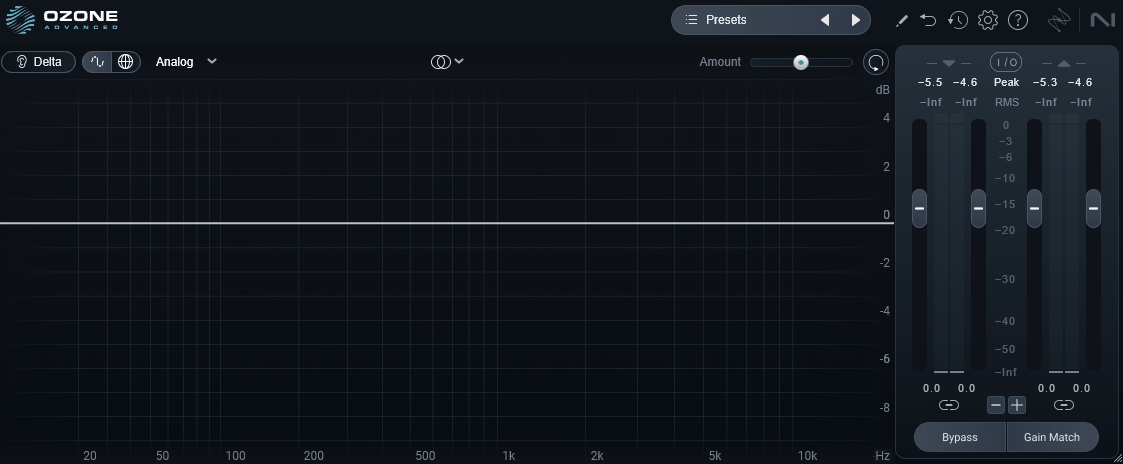
A solid choice for producers who want a clean, mastering-grade EQ without spending money, Ozone EQ is one of the more useful free options for mastering work. What I appreciate about iZotope’s plugin is how transparent it sounds. It’s pulled straight from the flagship Ozone mastering suite, so the audio quality is genuinely solid for mastering tasks. On a master bus, it sits comfortably without adding unwanted color.
The plugin is designed for clean, precise mixing and mastering moves, which makes it useful when you want to make adjustments without changing the character of the mix. For producers building a free mastering chain, this EQ earns its place through pure utility.
- Eight Bands Of EQ
You get eight fully parametric bands with adjustable frequency, gain, and Q, which is more than enough for most mastering tasks. Each band can be soloed for quick frequency identification when you’re trying to find a problem area on a master.
The bands behave musically even at heavier settings, so you can make bigger moves without things falling apart or sounding artificial.
- Spectrum Analyzer
The built-in real-time analyzer gives you a clear visual reference of what’s happening across the frequency spectrum. It overlays directly on the EQ curve, which makes it easier to make informed mastering decisions rather than guessing.
I find it useful when balancing low-end energy on a master, since the analyzer shows you exactly where things are sitting and where adjustments might help.
- Multiple Filter Types
You get bell, shelf, and high-pass/low-pass filter options that cover most mastering EQ tasks. Switching filter types is instant, and the curves react smoothly without any audible artifacts.
I lean on the shelves for broad tonal shaping at the master stage, where you usually want gentle, broad moves rather than narrow corrections.
- Clean Workflow
The interface is clean, scalable, and easy to read, which matters when you’re spending time on detailed mastering work. Nothing feels stripped down to justify the zero price tag.
For producers who want a workhorse EQ that just gets out of the way, this plugin handles that role well at the mastering stage. Ozone EQ has earned a place in my mastering chain because it sounds transparent, looks clean, and behaves predictably, which is exactly what I want from a mastering EQ.
Ozone EQ comes in VST3, AU, AAX, and standalone formats for macOS and Windows users.
3. Variety Of Sound Density MKII
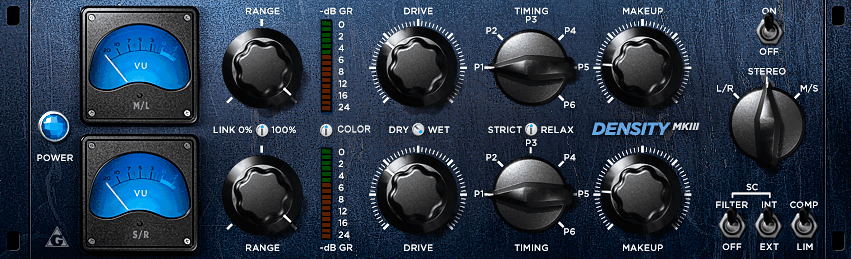
If you need a free vintage-style compressor for mastering, Density MKII delivers smooth, musical compression with subtle warmth. What I like about Variety Of Sound’s plugin is how musical it sounds. It models a classic VCA-style compressor with a slight analog flavor, which makes it a useful pick for master bus glue where you want compression that adds character along with control.
The interface looks a bit dated, but the sound quality holds up well next to paid alternatives. For producers who want a free mastering compressor with vintage character, Density MKII is a solid choice.
- Smooth Compression Curve
The compression curve feels smooth and musical, with predictable behavior across different threshold and ratio settings. It handles full mixes without obvious artifacts or harshness.
I find it useful for gentle master bus glue, where you want compression that pulls everything together without flattening the dynamics of the mix.
- Vintage Character
The plugin adds subtle vintage warmth to the source, even at neutral settings. This gives compressed masters a slightly rounded, analog feel that sits well as a finishing touch.
For producers chasing that classic, warm mix sound, this character is genuinely useful and saves you from stacking saturation plugins after the compressor.
- Sidechain Filter
The sidechain high-pass filter helps prevent the compressor from over-reacting to low-end energy on a full mix. This matters at the mastering stage where you don’t want the kick to trigger heavy compression.
I appreciate having this control inside the plugin since it keeps the master compression musical without needing an extra processor in front of it.
- Easy Workflow
The interface is simple and easy to read, with the essential controls visible at a glance. The plugin doesn’t bury features behind menus, which keeps the workflow fast.
For everyday mastering work, this kind of focused design helps you stay focused on the music rather than the plugin. Density MKII is a practical vintage compressor for mastering, and it’s a useful free option for producers who want analog flavor in their master bus chain.
Density MKII comes in VST format for Windows users.
4. bx_masterdesk Classic
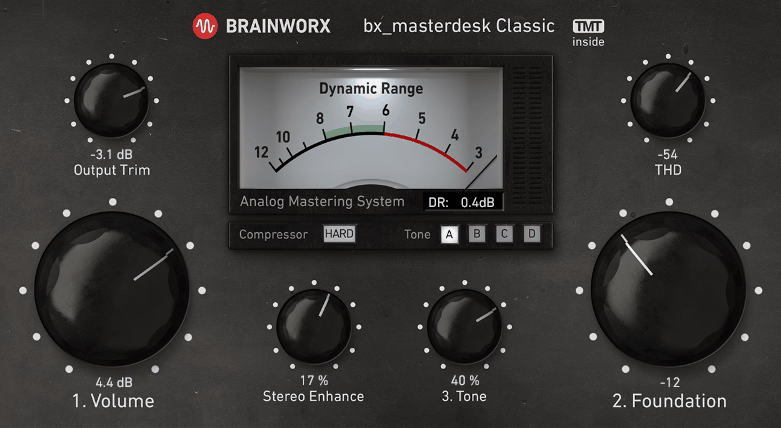
A complete free mastering chain in a single plugin, bx_masterdesk Classic is one of the more useful free mastering tools available for producers. What I like about Brainworx’s plugin is how it combines compression, EQ, stereo width, and a brick-wall limiter into one streamlined interface. The result is a polished master with little effort, which makes it a strong pick for quick reference masters or client demos.
When loaded on the master bus, this plugin gives you a fast, consistent mastering chain without setting up multiple plugins. For producers learning mastering or wanting quick masters, it’s a strong free pickup.
- All-In-One Mastering Chain
You get EQ, compression, saturation, stereo width, and limiting stacked into one easy interface, which saves a ton of plugin slots in your project. Each section is musically tuned, so even pushing settings hard tends to sound polished rather than crushed.
The workflow is fast enough that I can dial in a master in two minutes when I’m in a hurry, and the signal flow makes sense without needing a manual.
- Tone Controls
The simple tone controls let me brighten, warm up, or balance the overall mix without needing a separate EQ. I usually nudge things subtly here, since the rest of the chain is doing a lot of the heavy lifting.
The response feels musical and broad rather than surgical, and adjustments take seconds, which keeps me focused on the bigger picture rather than tweaking endlessly.
- Stereo Width
The stereo width controls open up your master without making it feel hollow or phasey, which is rare in free plugins. I reach for this when a mix feels narrow and needs that final wide, modern feel.
It pairs nicely with the limiter so the width stays consistent even at higher loudness, and the results genuinely sound mastering-grade.
- Built-In Limiter
The brick-wall limiter at the end of the chain handles loudness duties cleanly, with minimal artifacts even when pushed hard. It pushes well into commercial loudness territory without sounding squashed or fatiguing.
I find it handy for quick demo masters where you need something loud and competitive fast, and for a free plugin, this limiter alone justifies grabbing the whole chain.
- Quick Workflow
Everything is laid out so you can get a usable master in under five minutes, which is helpful for producers who don’t want to spend hours mastering. It also doubles as a learning tool, since you can see how a full mastering chain typically flows.
I appreciate that the visual feedback is clear and stays out of the way, which keeps your focus on the actual sound. bx_masterdesk Classic is a useful pickup for producers who want quick masters or want to learn how a mastering chain flows, and it earns its place in any free mastering setup.
bx_masterdesk Classic comes in VST, VST3, AU, and AAX formats for macOS and Windows users.
5. Analog Obsession BUSTERse
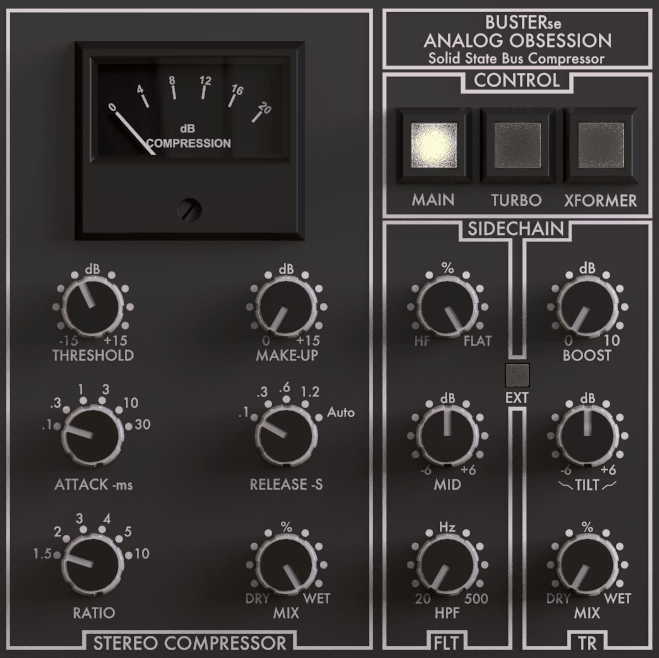
For producers who want a free SSL-style bus compressor for the mastering stage, BUSTERse is a useful pickup that delivers musical bus glue. What I appreciate about Analog Obsession’s plugin is how punchy and musical it feels for a free compressor. It captures that VCA-style glue that producers usually pay for, and it earns a spot on master buses, drum buses, and mix buses where you want gentle cohesion.
The interface looks straightforward, but the extra modes and transient controls give it more flexibility than the original SSL-style designs. For producers building a free mastering setup, this plugin handles bus glue duties well.
- Compression Controls
The standard attack, release, ratio, threshold, and makeup gain layout behaves exactly the way I’d expect, with predictable, musical results. Setting it on a master bus and dialing in gentle glue takes seconds rather than minutes.
The compression curve feels glued and forward, which is what I want at the mastering stage where you usually run low ratios with gentle threshold settings for cohesion rather than heavy compression.
- Dry/Wet Mix
The built-in mix knob lets me easily blend in parallel-style compression without setting up extra routing. I usually keep this conservative on a master bus to add punch without losing dynamics.
It saves me from creating dedicated parallel buses, which keeps the project view tidy and the workflow simple.
- Sidechain Options
The internal sidechain with high-pass filter keeps low-end energy from triggering the compressor too hard, which matters at the mastering stage where you don’t want the kick to over-trigger compression.
This control alone makes BUSTERse more flexible than a lot of free compressors, and the filter feels musical rather than surgical, so it never sounds harsh on full mixes.
- Xformer Mode
The transformer emulation adds a subtle low-mid weight that helps glue layers together more musically. This is genuinely useful at the mastering stage where you want subtle character along with compression.
I appreciate this kind of added flavor since it makes BUSTERse feel more like a hybrid plugin rather than just a clean SSL clone. BUSTERse is a practical bus compressor for mastering work, and it’s a useful free pickup for producers who want musical glue on their master bus.
BUSTERse comes in VST2, VST3, AU, and AAX formats for macOS and Windows users.
6. Venn Audio Free Clip 2
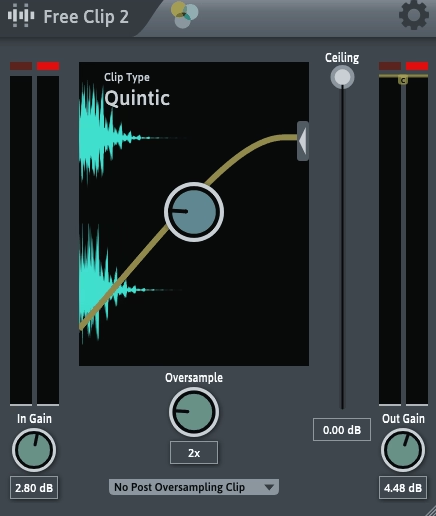
Closing out the list, Free Clip 2 is a free clipper plugin that handles the loudness stage of mastering well. What I like about Venn Audio’s plugin is how clean and useful it is for gentle clipping or harder loudness shaping. Clippers are often used as the final loudness step before or instead of a brick-wall limiter, since they can squeeze extra volume out of a master while keeping things sounding open.
Placed at the end of a master chain or right before a limiter, this plugin can catch peaks and gain extra loudness. For producers building a modern mastering chain on a budget, Free Clip 2 is a solid free pickup.
- Clean Clipping Behavior
The clipping behavior is clean and predictable, with adjustable hardness that lets you choose between gentle soft clipping and harder peak control. This makes it useful for both transparent loudness gain and more aggressive clipping styles.
I find it handy at the mastering stage where you want to shave peaks before a limiter to get more loudness without obvious distortion.
- Adjustable Threshold
The threshold control lets you dial in exactly how much clipping is happening, which gives you fine control over the loudness gain. Lower thresholds catch more peaks, while higher thresholds keep clipping subtle.
For producers building a modern loudness-focused mastering chain, this kind of adjustable threshold gives you the flexibility to fit different genre and loudness goals.
- Simple Workflow
The interface is minimal and focused, with just the essential controls visible. There’s no learning curve, which makes the plugin easy to dial in quickly during mastering.
I appreciate this kind of focused design since it keeps the mastering process moving without unnecessary complexity at the loudness stage. Free Clip 2 is a practical free clipper for the loudness stage of mastering, and it’s a useful pickup for producers building a modern mastering chain on a budget.
Free Clip 2 comes in VST and AU formats for macOS and Windows users.
Last Words
Putting this list together reminded me that free mastering plugins have come a long way, with several options that can genuinely handle real mastering work for producers learning the craft or working on their own releases.
If even one of these earns a spot in your DAW template, the list has done its job. Try a few out on actual mixes to see how they fit your workflow, since the right mastering chain often comes down to feel and the genre you’re working in rather than just the feature list.

I created VST Plugin News to share the latest updates on top-quality plugins with you. Most plugins featured here offer trial versions, and when you buy through retailers like PluginBoutique, Native Instruments, or Plugin Alliance, you help keep this site running through commissions without paying anything extra.
I only showcase plugins I actually use or would genuinely choose for my own work. Price tags don’t influence my recommendations. If I love a plugin, I’ll feature it regardless of cost. For pricier options, I always suggest trying the demo first when possible. Trial versions typically include full functionality, giving you a complete experience before committing. I hope my content proves valuable for your needs. Thanks for stopping by.